
10DLC Compliance
In order to combat spam, phone carriers (Verizon, AT&T, etc.) now require that every text message be sent from a verified entity. 10DLC stands for 10-digit long code, which refers to local US phone numbers with a standard area code, like (415) 555-1234. Solidarity Tech uses these phone numbers for your Chapter Phone Numbers, in order to provide a local number that you can use to for texting and calling your supporters.
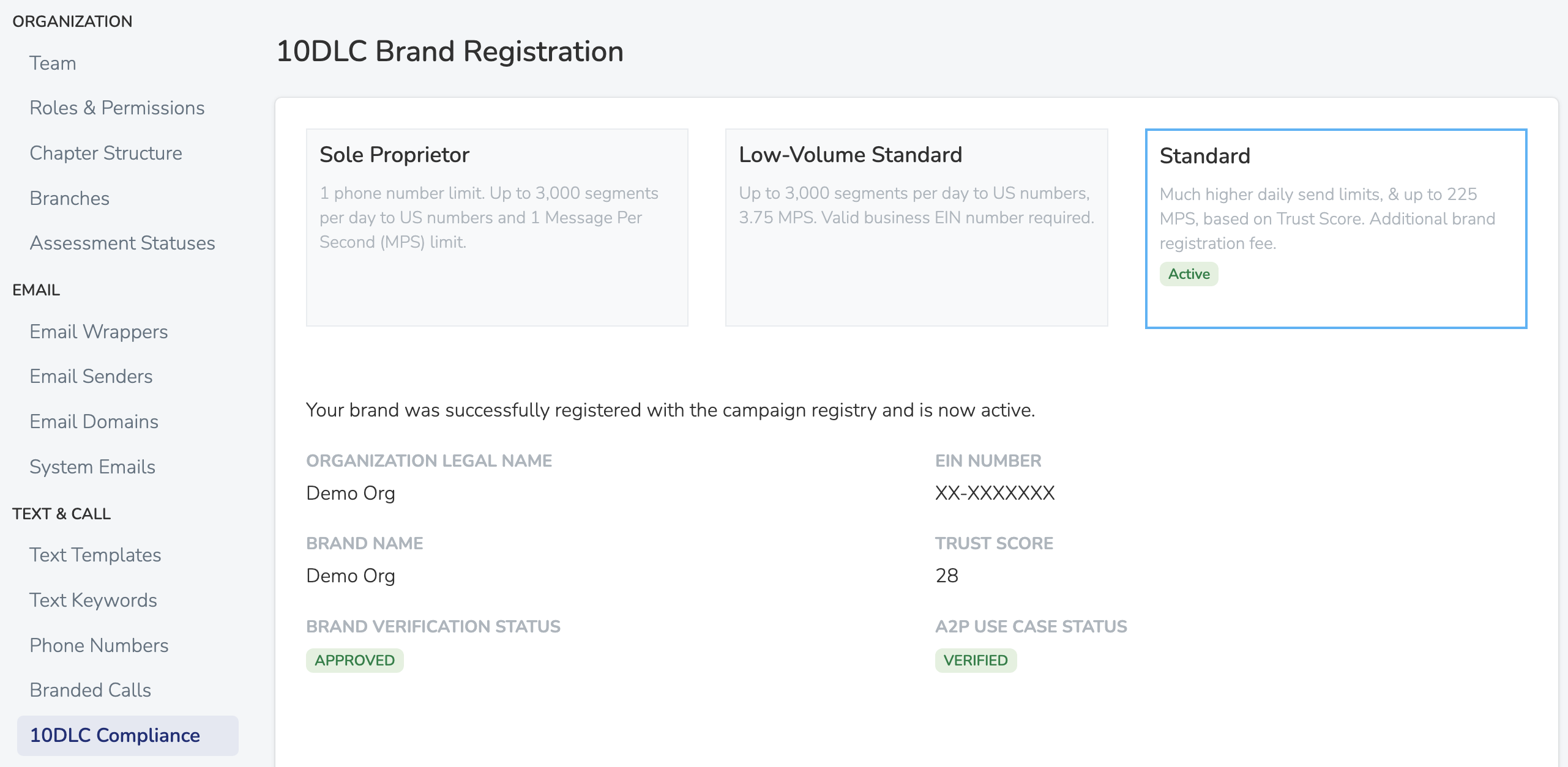
When you first signup with Solidarity Tech, we will automatically register your organization with The Campaign Registry in order to comply with all 10DLC texting regulations. Depending on whether your organization has a EIN (employer identification number), we will either register you as a "Sole Proprietor" or a "Low Volume Standard" brand. You will have more success sending text messages when you register with an EIN, and you also won't be limited to a single Chapter Phone Number.
You can always upgrade your brand registration or view it's current status, via the 10DLC Compliance section in the Settings tab of the dashboard.
Sole Proprietor
If no EIN is provided upon signup, you will be registered as a Sole Proprietor brand. This brand will limit you to sending 3,000 text segments per day, at a rate of 1 message per second. You will also be limited to only one Chapter Phone Number. It is advised to secure an EIN, and upgrade your brand to either Low Volume Standard or Standard, as soon as you can.
Low Volume Standard
If EIN provided, you will be registered as a Low Volume Standard brand by default. This brand will limit you to sending 3,000 text segments per day, at a rate of 3.75 message per second. If you need to send more than 3,000 segments in a day, upgrade to a Standard brand.
Standard
A Standard registration has two fees. You pay a one-time $49 registration fee when you submit. After approval, a $10 monthly campaign use case fee goes on your monthly invoice. The Standard brand offers the highest daily limits and sending rates. The exact limits that The Campaign Registry assigns to you will be visible in the dashboard once your brand registration has been approved.
Sub-Organization Brand Registrations
If your organization has sub-organizations, each sub-organization can register its own 10DLC brand with The Campaign Registry. Phone numbers belonging to a sub-organization route through that sub-organization's brand and messaging service once it's approved, independent of the root organization's brand.
To submit a brand registration for a sub-organization:
- Go to Settings > 10DLC Compliance
- If you manage more than one organization, use the Organization dropdown at the top of the page to select the sub-organization
- Submit a Low-Volume Standard or Standard registration the same way you would for the root organization
A few things to know:
- Sole Proprietor is not available for sub-organizations. Sole Proprietor is restricted to a single individual at the root organization level. Sub-organizations must use Low-Volume Standard or Standard.
- Cost. A sub-organization brand adds the carrier campaign fee plus $10/month to your bill, from the time the brand is approved and its campaign is verified. A Standard registration also charges the one-time $49 fee when you submit. By default the charge goes to the root organization's invoice. If the sub-organization has its own payment method set up, the charge is routed to the sub-organization's invoice instead.
- Campaign Verify is available for sub-organizations on the same terms as the root organization. See Campaign Verification.
- You can't clone an approved brand to a sub-organization. Each sub-organization brand is registered as its own entity with The Campaign Registry, so the existing approved brand shortcut is hidden when you're managing a sub-organization's brand.
- Permissions. To manage a sub-organization's brand, you need an Organization scoped role at that sub-organization or at an organization above it. The role must be Admin or include 'Manage 10DLC Compliance'. Chapter scoped roles do not count.
- Phone routing happens automatically. Once the sub-organization's brand is approved, chapter phone numbers belonging to that sub-organization and its descendant chapters begin routing through the new brand's messaging service. Team phone numbers always route through the root organization's brand.
While Your Registration is Pending
Your organization can send texts immediately, even before your brand registration is approved. Until approval, your sending rate and daily message limits may be lower than your final approved limits. Once your registration is approved, your full sending rate and daily limits take effect automatically.
Common Registration Issues
| Issue | Cause | Solution |
|---|---|---|
| Brand registration rejected | Organization name does not match EIN records, new or unrecognized EIN, or incorrect organization type | Verify that the organization name and EIN match exactly. Correct the information and click 'New submission' in Settings > 10DLC Compliance. After a second rejection, the page shows the date when you can resubmit. |
| Registration taking a long time | Your registration is still in review | Your texting is not interrupted while you wait. |
| Daily message cap reached | T-Mobile enforces strict daily limits based on your registration level | Upgrade to Standard registration for higher limits. Political campaigns can use Campaign Verification to remove T-Mobile daily caps entirely. |
For political campaigns: Campaign Verification ($95 one-time fee) validates your campaign with carriers and removes daily messaging caps on T-Mobile. Campaign Verify is for a 527 political organization (a campaign, party, or PAC). Solidarity Tech then registers a separate Political brand and campaign. Your regular brand keeps sending while the Political campaign is in review.
Updated 19 days ago