
Websites
Solidarity Tech allows you to create Websites on which you can host your Pages. Websites are highly configurable, and you can easily connect them to your own subdomain or root domain.
Solidarity Tech lets you create websites that host your pages. You can connect a website to your own subdomain (eg. act.yourorg.org) or root domain (eg. yourorg.org). A custom domain needs the Standard, Professional, or Enterprise plan. At the website level, you set the navigation bar of your pages and a starting footer for new pages.
You can use the website as your primary website, or as a secondary site for your Solidarity Tech pages.
Multiple Websites
Organizations on the Standard plan or higher can create multiple websites, for example one per chapter or one per campaign. Each website has its own theme, navigation, footer, and settings, and you can connect each one to its own custom domain.
Creating a New Website
- Click Pages in the sidebar.
- At the top of the Pages screen, click the All Websites button.
- At the bottom of the list, click Create new website.
- In the Create a Website window, enter the Website Name and a URL Prefix for the .solidarity.tech address. Check the confirmation box and click Create Website.
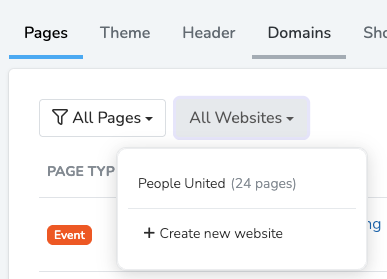
Once created, you can customize the website's colors and branding, navigation and footer, and connect a custom domain.
Settings
The website's Settings tab holds these settings:
- Home Page: the page shown at the root of your website's URL.
- Default Form and Default Landing Page Navigation: starting points that some new pages copy.
- Google Analytics: your tag in the format
G-XXXXXXX. - Favicon: the small image shown in browser tabs. It must be 32 by 32 pixels.
- Site-wide HTML Head Content: code placed on every page. See Custom Code Injection.
- Cookie Consent Banner: check Show Cookie Consent Banner to show a banner that lets visitors accept or reject cookies. Code in Scripts After Cookie Acceptance runs only after the visitor accepts analytics cookies.
- Social Media: the accounts whose icons show on page builder pages when the Navigation or Footer section has Show Social Icons on.
Your organization is responsible for following the laws that apply to cookies and visitor privacy on its website. Solidarity Tech does not give legal advice.
Website Scope & Restrictions
Website Scope is the organization or chapter that owns the website and its pages. Turn on Restrict to This Scope Only to hide the website from team members at the chapters and organizations below that scope. Every scope always keeps access to at least one website, even when restrictions would leave it with none.
Import Blog Posts
You can import blog posts from WordPress or Squarespace. Both export a WordPress XML file.
- From WordPress: go to Tools > Export > select All content > Download Export File.
- From Squarespace: open the Import & export content panel and click Export. Click the WordPress icon. When the export is complete, click Download.
Then, on your website's Settings tab, click Import from WordPress, upload the file, and pick the posts to import. Each post becomes a Blog Post page. Imported posts are public as soon as the import finishes.
Push Notifications
The Push Notifications tab shows subscriber counts and lets you send push blasts to supporters who subscribed. See Push Notifications.
Shortlinks
The Shortlinks tab lets you create short URLs, each with a QR code. See Shortlinks.
Updated 13 days ago